Planner | Mobile Travel Planning App

Discover the new way to plan your best moments. An intuitive travel planning app built to help transform stressful planning into an organized and efficient system.

Project Outline

OVERVIEW
Imagine a single platform where you can message, invite, organize, and plan large events with ease. Welcome to Planner — the all-in-one event planning app designed to make stressful organizing simple and enjoyable. For my GBDA 210 course, Introduction to User Experience and Design, my team and I were tasked with developing an optimal solution for the event planning space. Frustrated by the inefficiencies of existing apps, we created a prototype that addresses key industry pain points. Over the course of the semester, from September to December, we followed a structured design process, dividing the project into four milestones and culminating in a final presentation.
CLIENT
In Class Project
TIMELINE
4 Months
ROLE
Research, wireframing, prototyping and user testing
PROJECT TYPE
Academic
CHALLENGE
"What apps do people use when planning for large events?"

Around 74% of Americans say that planning a vacation is more stressful to them than staying at work. The process of planning a trip or event is notorious for being extremely difficult, stressful and drawn out. This process usually takes precise coordination, and requires for organizers to use multiple apps to track various metrics and details. My group, which consisted of 5 members including myself, was tasked with developing a conceptual app that could solve this problem and mitigate the negative stigma around planning permanantly.

Empathize and Define

RESEARCH & PAIN POINTS
During our first meeting, we discussed different angles to attack our prompt with, and ideated on how we could conduct research to better support our ideas. We started by analyzing current planning apps on the market, starting with apps such as GameChanger, TeamSnap and EventBrite. We listed down certain pain points that we found while using the apps, and started thinking of possible solutions that would improve the user experience.

• Apps are niche and can only be used to plan specific events
• User has to add other users through contact info such as email or phone instead of username
•Lack of user choice when it comes to adding alternate details
• Notifications are infrequent and mostly unhelpful; does not notify users when changes are made
SOLUTION
• Create app with intention of being used for multitude of events, such as weekend getaways, weddings, sports, work events etc
• Add user profile feature so that adding users will only take one click (similar to adding Snapchat users to group chat)
• Give user free reign to add whatever details they want while still offering option for template (such as word document)
• Notifications can be turned on for certain things and users will be notified when admin makes changes to event they are in
INTERVIEWS
After our initial research, we moved onto conducting semi-formal interviews. We conducted three interviews, emphasizing the perspectives of participants whose lives were incongruent with each other. We ended  up interviewing one University of Waterloo undergraduate student, a woman in her 60s, and a man in his mid-late 30s. Listed below is a list of recurring themes/pain points that were noted during the interviews. Here are some of the findings:

• Too many different mediums to communicate through (mom is on text, grandma is on Facebook etc)
• Hard to remember set of requirements + to confirm that everyone is aware of said requirements (ex; wear red)
• Trying to confirm who was and wasn’t coming was hard, as some people responded right away and others did not, while others cancelled
PERSONAS
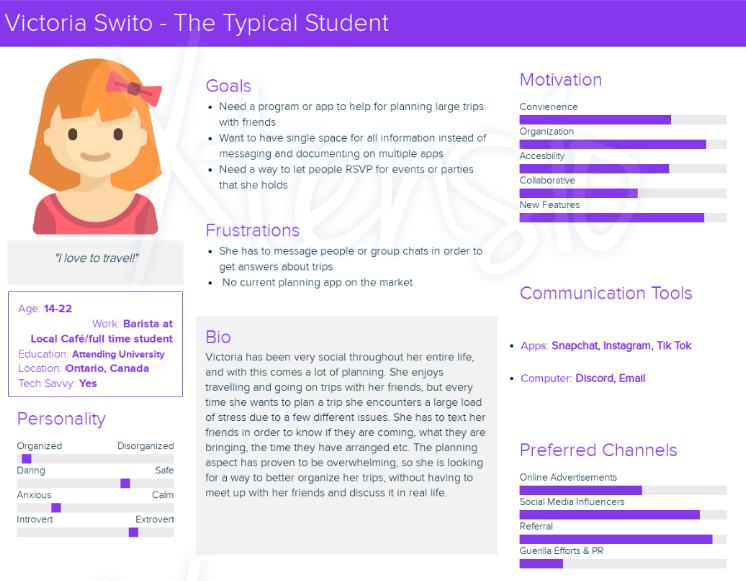
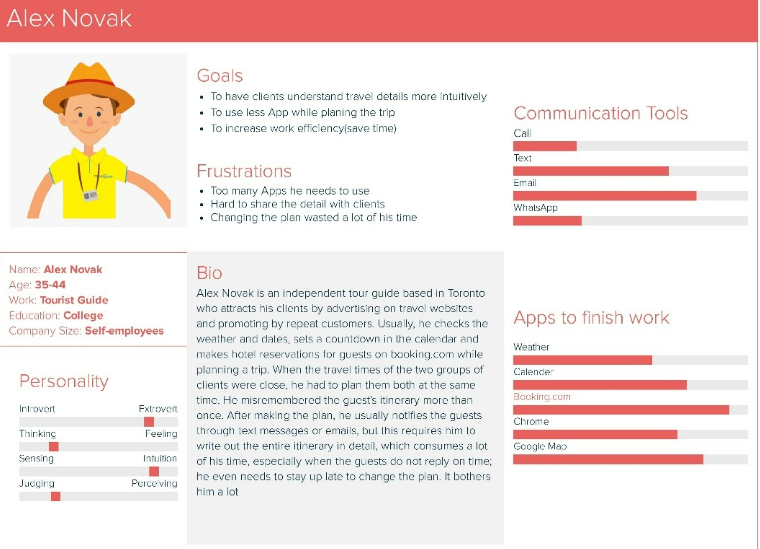
Combining our initial research with the findings from the interviews, we created two user personas to be used as a guide for later design decisions.
HOW MIGHT WE STATEMENTS
• HMW make the app adaptable to a variety of events, such as vacations, school trips, business trips, weddings etc
•...reduce common barriers to competent planning, such as bad communication, inconsistent information and unknown RSVP statuses?
•...centralize key information to all users?
•...provide users with a fun and intuitive experience that makes planning events less or not stressful?
OVERALL PROBLEM
While current planning apps were functional, they were unable to meet a plethora of user needs that would significantly improve the user experience and provide an optimal solution. Users who were not utilizing these apps, were having a hard time planning due to a multitude of barriers, with the most prevalent being the inability to centralize important information such as rsvp, event details and check lists.

Ideation & Prototyping

REQUIREMENTS
Using the research conducted in the previous define and empathizing stages, it was time to ideate on what the app would look like, include, and be used for. The team split off and created different scenarios where the app could be used to help plan events, in an effort to apply the app to as many scenarios and demographics as possible. These scenarios included but were not limited to: a teacher planning a field trip, a student planning a camping trip with friends, and a manager planning an out of office work party. Combining these with the aforementioned research insights, we were able to create a list of system requirements:
MUST INCLUDE
1. Ability to create multiple event documents
2. Documents require certain information before adding other options (time, location, details, etc)
3. Event Reminders (notification/toggle).  
4. Ability to confirm attendance and availability - notifications option (✅ or ❌). For example, an RSVP pop-up before you can access the information.  
5. User profiles (sign up with email).
SHOULD INCLUDE
1. Editable templates for basic events or blank templates for full user customization
2. Different roles for users to either view, edit or comment on event document (think inviting people to edit a word document)
3. Notifications fof countdown until event (*____ is 2 weeks away!*)
COULD INCLUDE
1. Built in budget calculator to help predict cost of event
2. Weather function that helps to suggest different dates or attire for event (bring rain jacket!)
3. Ability to share photos from event on app, or to link other social media
FIRST SKETCHES
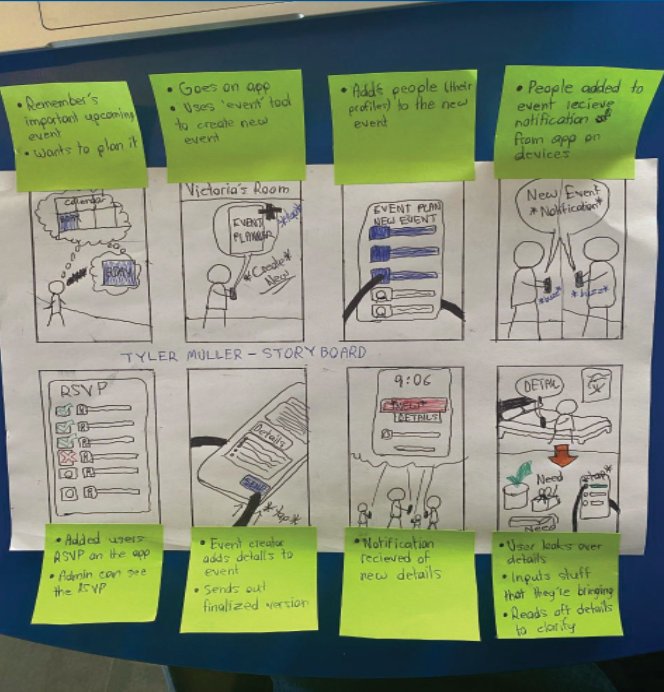
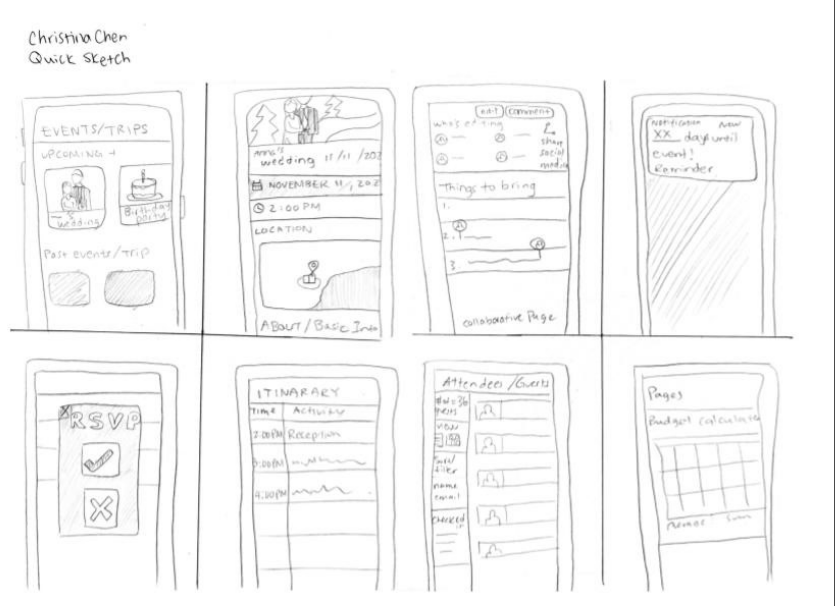
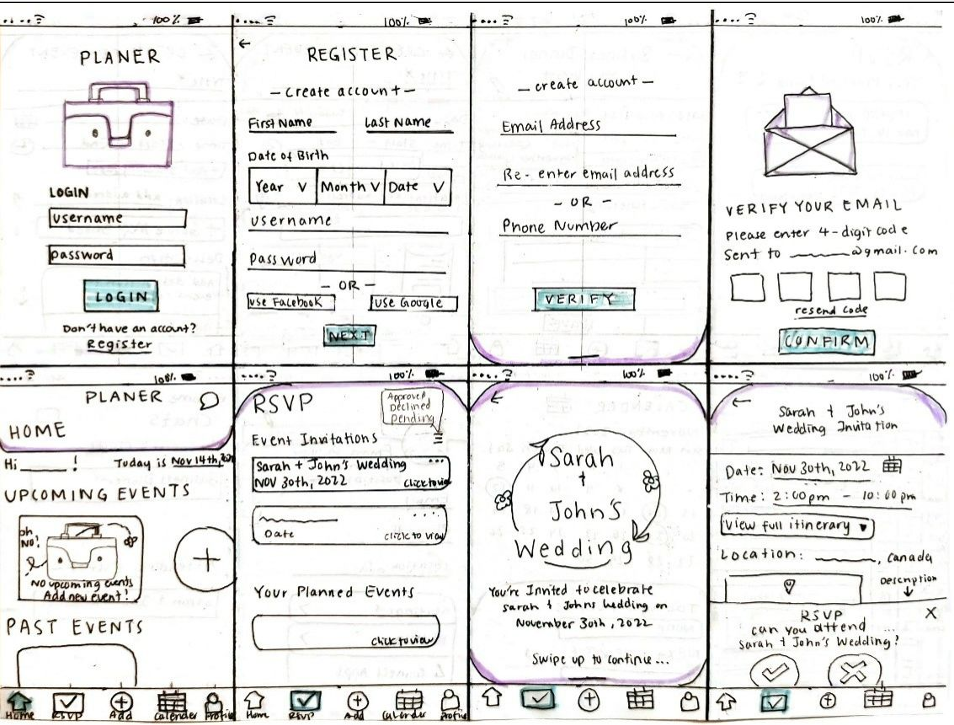
Now that our concept was starting to become more defined, it was time to put our visions onto paper and compare our different perspectives. We started by sketching out some ideas using the Crazy 8’s method, and then creating storyboards that detailed how a user would interact with our product.
LOW FIDELITY PROTOTYPING
Next we moved onto a low fidelity prototype, starting with a functional paper prototype of how the different functions of the app would actually look. Based on storyboards and the design requirements that we had laid out, I was able to create our very first iteration of the prototype as seen in the video below. Building on the concepts and ideas from my video, a group member created her own low fidelity take on the app, which helped lead us into user testing.

Testing and Implementing Feedback

DESIGN CHANGES
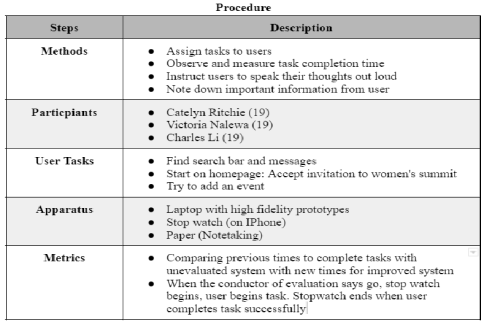
Using our low fidelity prototypes, we conducted some user testing with people of various technical proficiency and assigned them tasks to complete. We asked participants ot complete the task we assigned, and then took notes based on certain metrics. We also had a fellow UX researcher to come in and give his take on our prototype, which is listed below:
FEEDBACK
1. UI design is inconsistent across the app. Communicate with group members and devise design brief to guide process
2. Enhance nav bar usability by making it smaller and more compact
3. Increase distances between sections to mitigate user errors
4. Shrink images down to enhance usability and effectiveness throughout the design
TESTING
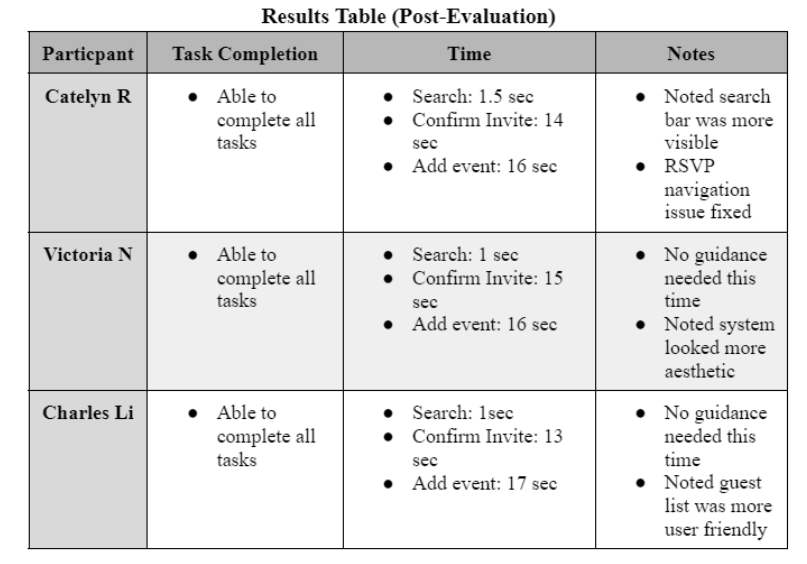
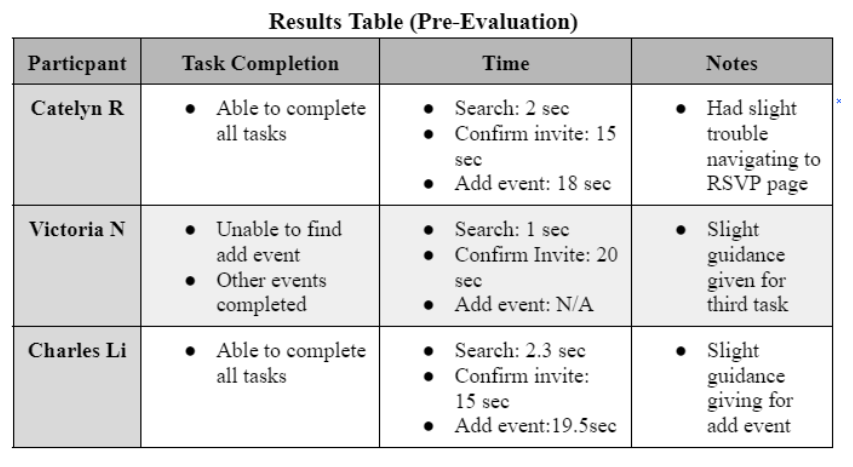
After our initial feedback was implemented from the ux researcher, we devised a couple of tasks to test real users on using our prototype. This process helped us to clean up a lot of small issues that we did not notice on our own evaluations, helping to imrpove the final, high fidelity prototype. Below are some of the results taken from these user tests.

Results

FINAL PRESENTATION
As we approached the end of the semester, we were given a chance to present our app in front of our class. Our final project was able to achieve a final mark of 92%.
HIGH FIDELITY PROTOTYPE

Reflection

1. BE AWARE OF 'SACRED COWS'
It is easy to become attached to an idea early in the design process and attempt to force it to fit, even when it no longer serves the project’s goals. It is crucial to critically evaluate which features have faced little skepticism and thoughtfully assess whether they are truly necessary.
2. LEARN WHEN TO PRIORITIZE
Some of the largest issues during development occurred due to an inability to prioritize certain tasks while putting others on the back burner. Being able to identify which tasks are necessary to creating the MVP (minimum viable product) is crucial when guaranteeing success at later stages of the design process.  
3. COMMUNICATION ABOVE ALL
Ensuring that all group members are on the same page is one of the most important factors when it comes to completing a project smoothly and with little to no errors. Frequent meetings that allow for honest feedback are a must for any worthwhile design venture.
Back to Top ↑

Wanna get in touch?

Let's Connect !